
Quick Summary
This guide provides practical electric gate opener troubleshooting procedures to help property owners quickly diagnose unresponsive driveway gates, humming motors, and failed closing cycles. Diagnostic specialists at Ironworks Gate Co. emphasize that apparent motor breakdowns often stem from basic power cuts, dirty optical safety sensors, or drifted travel limits that can be resolved without complex tools. Readers will learn how to safely test radio controls, engage manual bypass mechanisms, and identify when high-voltage wiring or capacitor faults require professional repair.
Electric Gate Opener Troubleshooting – Fix Driveway Gates Fast
When an automated driveway gate stops working, systematic troubleshooting helps you identify whether you are dealing with a power interruption, a misaligned safety sensor, remote battery failure, or a control-board or limit-switch fault before scheduling a service call. Gate operators rely on entrapment protection circuits. If a safety photo-eye detects an obstruction or loses alignment, the system will prevent the gate from closing to protect vehicles and pedestrians.[2]
As specialists at Ironworks Gate Co. often note, what looks like a motor failure is often an active safety hold, a limit switch issue, or an interrupted power circuit. By methodically checking power delivery, optical sensors, control inputs, and mechanical limit settings, you can resolve most common operational stops.
Quick Diagnosis: Electric Gate Opener Troubleshooting at a Glance
Before taking covers off or ordering parts, run through the core failure points: verify power at the breaker panel, check physical drive engagement, clear and align optical sensors, test remote batteries, and check for limit-switch or control-board faults.[1]
Immediate Action Checklist
- Verify Power and Drive Engagement: Check that the circuit breaker has not tripped and that the unit is receiving power. Confirm that the manual release mechanism has not accidentally disengaged the drive.
- Clean and Check Optical Sensors: Clear dirt, debris, and obstructions from the photo-eye lenses. Verify that the indicator lights show proper alignment.
- Isolate Input Controls: Test fresh batteries in your handheld remote, check wired push-buttons, and look for stuck keys on access keypads.
When to Stop and Call a Professional
While clearing sensor lenses and replacing remote batteries are safe DIY tasks, stop troubleshooting if you find damaged wiring, suspected internal component failures, or damaged drive hardware. Gate systems carry mechanical loads that can cause injury without proper service tools.
What You Need Before Starting Driveway Gate Opener Diagnostics
Having basic tools ready prevents diagnostic errors and protects control circuits during testing.
Essential Tools and Safety Gear
- Digital Multimeter: For checking incoming power and verifying electrical continuity.
- Insulated Hand Tools and Clean Microfiber Towels: For adjusting mounting brackets and wiping optical lenses without scratching them.
- Manufacturer Release Key: The specific mechanical release key or manual bypass lever supplied with your operator.
Safety Precautions Around Moving Automation
Always switch off the primary breaker feeding the operator before opening control enclosures or inspecting wiring. Never place your hands near moving drive mechanisms, swing arms, or guide rollers while power is connected.
Step 1: Verify Power Supply, Breaker Panels, and Disconnects
Need electric gate opener troubleshooting?
We’re available now - call for a fast, free estimate.
A gate that fails to respond to any input is often suffering from an interrupted power feed.
Checking the Main Subpanel and Power Connections
- Reset Breakers: Locate the dedicated breaker in your electrical panel and cycle it off, then on. If the operator connects to a reset switch or power outlet, verify that it has not tripped.
- Measure Input Voltage: Use a multimeter to verify steady power delivery to the operator junction box according to manufacturer specifications.
- Inspect Secondary Power Sources: On systems with battery backups or solar panels, check terminals for secure connections, corrosion, or low charge.
Inspecting the Power Disconnect Switch
If your installation includes an external power disconnect switch, confirm it is set to the on position. Check for loose wiring or visible faults that might disrupt power to the operator.
Step 2: Clean and Realign Photo-Eye Safety Sensors
Safety photo-eyes are a common cause of an electric gate that opens fully but refuses to close. When the infrared beam between the transmitter and receiver is obstructed or misaligned, the operator logic board typically holds the gate open or reverses travel.
Addressing Optical Obstructions
Dirt, dust, spiderwebs, and overgrown landscaping can block the sensor path. Clear away physical obstructions and wipe both sensor faces with a dry microfiber cloth.
Interpreting Sensor Indicator Lights
- Clean the Optics: Remove all grime and debris from both sender and receiver units.
- Read the Indicator LEDs: Most sensors display a steady indicator LED when the beam is aligned. A blinking or dark LED points to misalignment, dirty optics, or lost power.
- Realign Mounting Brackets: Loosen the bracket hardware slightly and adjust the angle until the status light indicates proper alignment, then tighten the hardware securely.
Step 3: Test Remote Transmitters, Keypads, and Manual Override Keys
When the gate does not respond to a remote control, Ironworks Gate Co. recommends isolating whether the issue lies with the transmitter, the radio receiver, or the control board.
Isolating Remote and Input Issues
- Test Input Controls: Replace remote batteries and inspect physical keypad push-buttons to ensure stuck keys are not holding the system active.
- Use Onboard Cycle Buttons: Open the operator control enclosure and press the manual cycle button mounted on the logic board. If the gate moves normally, the motor and board are functional, pointing to an issue with the remote, receiver antenna, or receiver wiring.
- Check Status Indicators: Check the diagnostic lights on the board to see if an active safety hold or input error is preventing operation.
Operating the Manual Release Mechanism Safely
If the electrical system remains unresponsive and you need access, use the mechanical bypass. For swing gates, unlock and release the arm clamp or pull the emergency pin. For slide gates, use the release key to disengage the drive mechanism from the chain sprocket so the gate can move manually.
Step 4: Inspect Possible Motor Capacitor and Limit Switch Faults
Need electric gate opener troubleshooting?
We’re available now - call for a fast, free estimate.
If your gate operator clicks or hums when triggered but refuses to move, possible causes include a faulty motor capacitor, a mechanical obstruction, or a misaligned limit switch.
Diagnosing Humming Motors and Potential Capacitor Issues
In some AC operators, a failing start or run capacitor may prevent the motor from producing enough starting torque to move the gate, causing an electrical hum. Inspect the capacitor housing for visible signs of damage, such as bulging or leakage, and consult a qualified technician if testing or replacement is required.
Resetting Open and Close Travel Limits
Travel limit switches signal the control board when the gate has reached full open or full closed positions. Over time, physical vibration can cause limit cams or magnetic sensors to shift out of position. When limits drift, the gate may stop prematurely or trigger safety cutoffs. Recalibrate the limit settings following manufacturer instructions until travel stops properly in both directions.
Step 5: Evaluate Control Boards and Electrical Connections
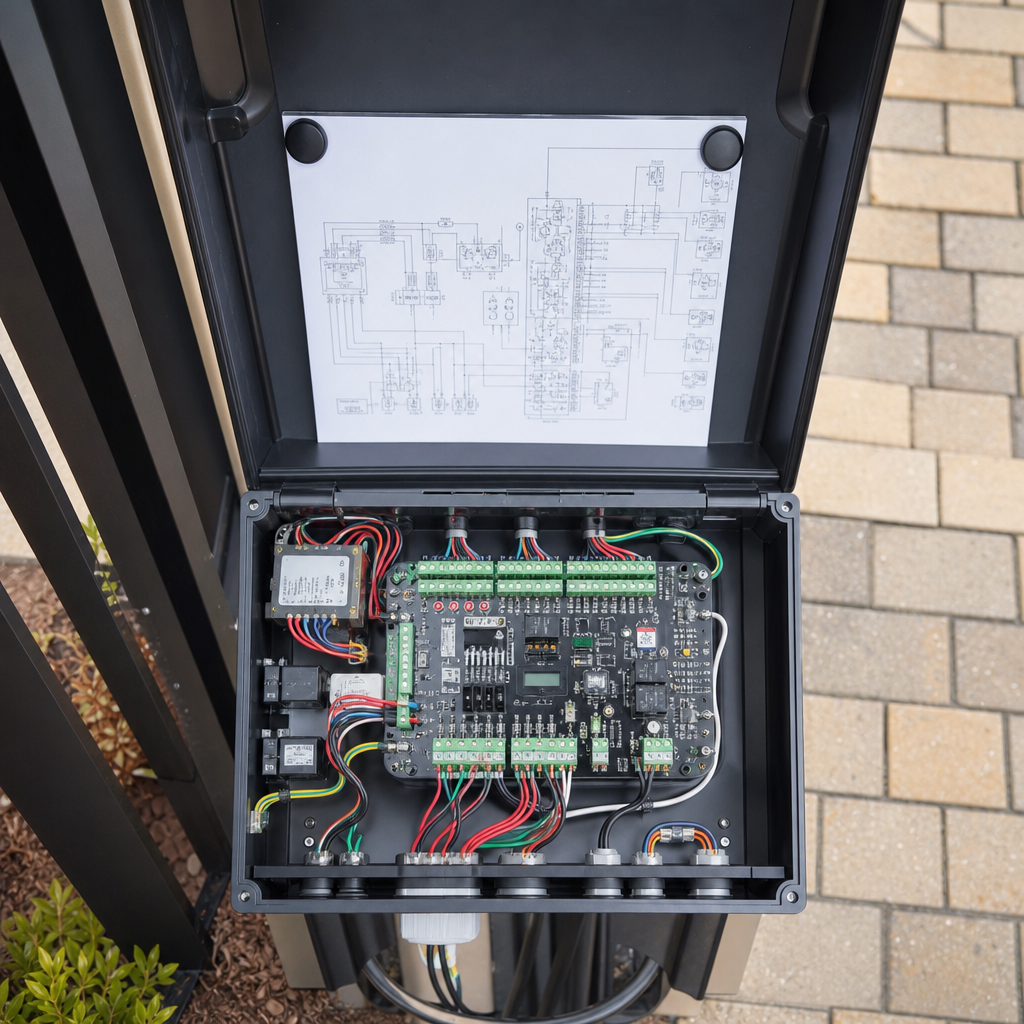
As explained by Ironworks Gate Co., the control board coordinates power, safety sensor inputs, travel limits, and motor operation. Control-board faults may lead to intermittent operation or total system failure.[3]
Control Board Diagnostic Indicators
Many control boards feature diagnostic indicator lights or digital readouts. A specific sequence of flashes or an error code can indicate issues such as an optical safety fault or limit-switch error. Always cross-reference the diagnostic display with the operator manual.
Inspecting Wiring and Terminal Connections
Inspect terminal block connections to ensure all control wires, safety sensors, and power leads are firmly secured. Check for loose wiring, corrosion, or physical damage that could cause phantom electrical faults.
Frequently Asked Questions About Electric Gate Repair
Why does my automatic gate open fine but refuse to close?
Automated gate operators are designed to stay open if safety sensors detect an obstacle. Common causes include a misaligned photo-eye sensor, dirty lenses, or an obstruction in the path of the gate.
What should I check if the gate motor hums but does not move?
A humming motor indicates that power is reaching the unit, but the drive cannot turn. Possible causes include a mechanical bind, an active manual disconnect, a misadjusted limit switch, or a failing motor start capacitor.
How can I tell if my remote control or the receiver is faulty?
First, insert a fresh battery into the remote. Next, open the operator panel and press the onboard cycle button directly on the circuit board. If the gate operates using the onboard button, the issue is likely related to the remote, antenna reception, or the radio receiver module.
How do I operate my gate during a power outage?
Use the physical manual release key or disconnect lever provided by the manufacturer. On swing gates, this typically involves releasing an arm clamp or bypass pin. On slide gates, turning the release key disengages the drive mechanism so the gate can slide open by hand.
Need electric gate opener troubleshooting?
We’re available now - call for a fast, free estimate.
Sources
- [PDF] WisDOT Structure Inspection Manual – Chapter 6 Electrical Systems – wisconsindot.gov
- How to Fact-Check With AI: Verify Claims, Sources and Websites – sigmabrowser.com (2026)
- Common Faults and Solutions of Limit Switches in … – jxnma.com
Related reading: Electric Gate Troubleshooting | Call Now-10% Off | Same-Day Service | Free Estimate
Related reading: Sliding Vs Swing Gate – Call Now-10% Off – Same-Day Service – Free Estimate
Related reading: Automatic Gate Repair – Call Now-10% Off – On-Site in 60 Minutes – Free Estimate
Frequently Asked Questions
How can I safely tell if a gate opener motor capacitor is blown rather than just jammed?
A humming motor paired with a gate that moves freely by hand usually indicates a failed start or run capacitor unable to produce starting torque. Because high-voltage capacitors retain dangerous electrical charges even after power is disconnected, Ironworks Gate Co. recommends scheduling a professional diagnostic rather than attempting DIY capacitor discharge and replacement.
Why does my electric gate control board trigger random error codes in coastal environments?
Salt air and humidity accelerate corrosion on terminal block contacts and circuit board traces, causing phantom resistance faults across safety inputs. Diagnostic specialists at Ironworks Gate Co. can clean oxidized terminals, test board continuity, and properly weather-seal enclosures to prevent recurring electronic failures.
How do I determine if a gate stopping mid-cycle is caused by drifted limit switches or track binding?
Disengage the drive using your manual release key and push the gate through its full swing or slide path by hand to check for physical friction. If the gate moves smoothly without catching, the issue stems from misadjusted limit switches, photo-eye beam interruptions, or logic board sensitivity settings.
About the author
 |
Sarah O’Connor Sarah is a technical writer specializing in home security and access control systems. With over eight years of experience writing for property management and contractor publications, she translates complex mechanical and electrical concepts into clear, actionable advice. She holds a B.A. in Communications from California State University, Fullerton, and frequently consults with certified gate technicians to ensure her content is accurate and practical. |
Gate not opening, off track, or opener dead?
We’re available now - call for a fast, free estimate.
Call Now - Free Estimate